Anyone who runs a website wants to know: who visited, where they came from, how long they stayed, what they looked at. The analytics tools out there either hand your data to a third party, or require installing a pile of dependencies. When I was setting up my own server, I didn’t want to spin up a database service just to add some analytics, so I wrote a lightweight one using Python’s standard library — called Site Analytics, and today I’m releasing it for everyone to use.
What it solves
The core idea is simple: frontend tracking, local storage, no touching Nginx logs. Logs are mixed with crawlers, CDN back-to-origin requests, monitoring health checks — all machine traffic — so the PV you calculate is distorted. Tracking only fires in real browsers, naturally filtering out that noise, and it also gives you time on page and bounce rate that logs can’t provide.
For example: out of a hundred requests, the logs might show only sixty from real humans, the other forty from various bots; what comes through tracking is basically all sessions with real browser environments, much cleaner data.
A few features I use myself
- Zero dependencies: backend uses only Python standard library (http.server), charts use local ECharts, no internet connection needed, no database to install;
- Data lives in a SQLite file on your own server, never passes through any third party;
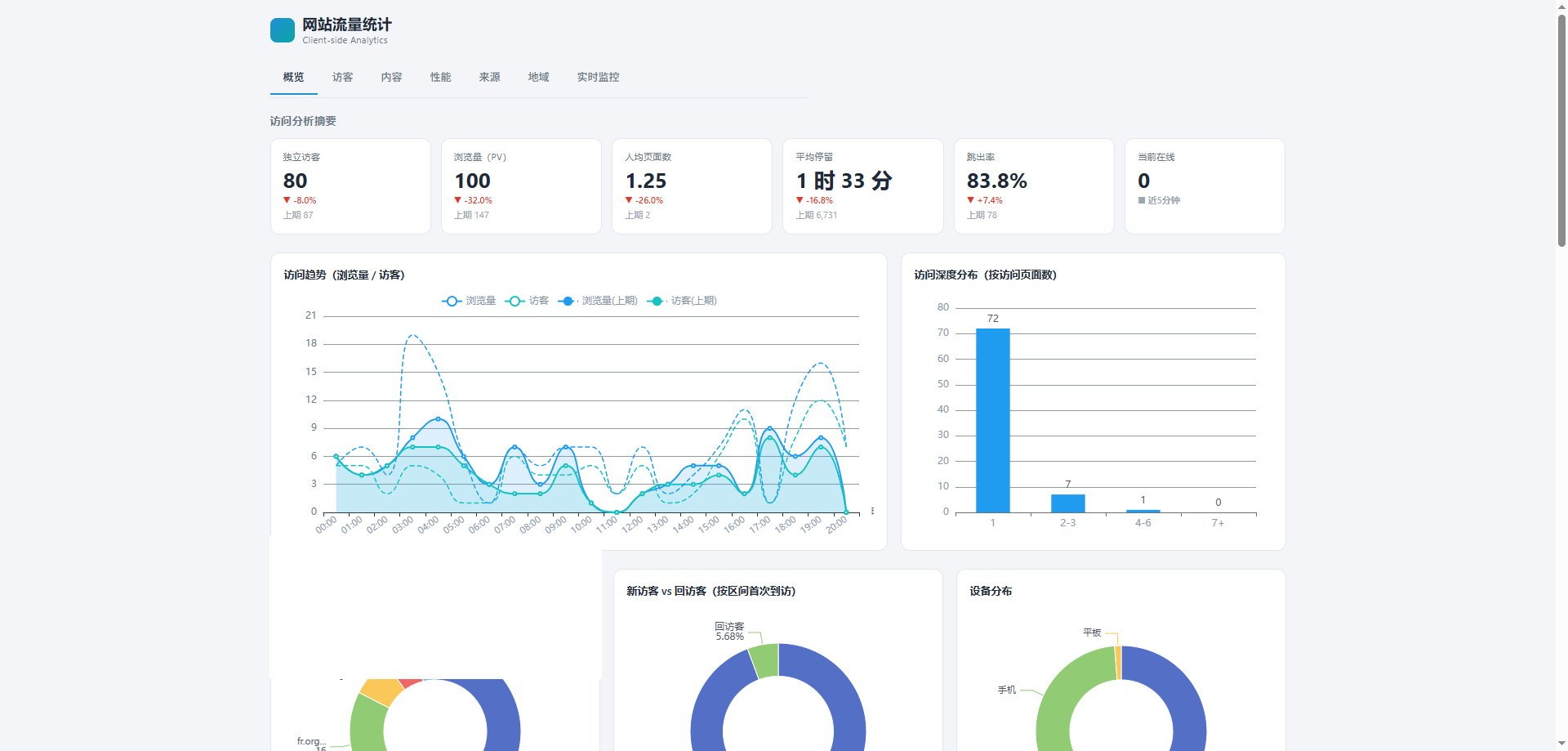
- Core metrics like PV, UV, bounce rate, average time on page, pages per session, plus dimensions for popular pages, referrers, devices, and browsers;
- Real-time monitoring dashboard, refreshes recent visitors every 5 seconds;
- Anti-fraud: automatically filters out webdriver and known crawler UAs, tags cloud hosting and data center sources as “suspected data collection”;
- Optional GeoIP for regional distribution, doesn’t affect other features if missing;
- Data retention period configurable in site admin, auto-cleans expired data, no worry about files growing indefinitely.
Why not just use something off the shelf
GA is powerful, but the data is in Google’s hands, and access from China is often unstable. Lightweight self-hosted options like Plausible are nice, but they require running a Node service and configuring a database — still heavy for someone who just wants to see some numbers. What I wanted was: one command to run, data stored locally, no dependency on any external service. Site Analytics was written to that target — after deployment it’s just a pure Python process plus a SQLite file, and backing up is as simple as copying the file. If you’re also fed up with being forced to hand visitor information to big tech just to see your data, this tool should be right up your alley.
How to use it
Add one line of tracking script at the end of the pages you want to track, fill in your site identifier. Click “Add Site” in the dashboard and it generates the code directly — copy and paste, no restart needed.
<script src="https://your-analytics-domain/tracker.js" data-site="example.com" defer></script>The backend runs on 127.0.0.1:8899 by default; externally, use Nginx, Caddy, or Apache as a reverse proxy with HTTPS. The repo includes systemd units, start and restart scripts, and a service management console — upgrades and rollbacks are one command. Servers in China can use the Gitee mirror to avoid GitHub rate limiting.
The dashboard is a single-page interface, with a top bar to switch between Chinese and English, and between dark and light themes. Below is a screenshot of the real-time dashboard from my own site (domain blurred):
On privacy
Visitor IDs are randomly generated in the browser, not tied to IP, so even if dozens of people in the same company share one NAT egress IP, they won’t be counted as one person. No form content is collected, no precise location — GeoIP only resolves to country and city level locally, nothing is uploaded.
A few deployment notes
I’ve hit a few pitfalls, noting them here: the reverse proxy must pass through X-Forwarded-For and X-Real-IP, otherwise the backend sees everything as 127.0.0.1, and region and referrer data will all be wrong; when using caching or JS combination plugins, directly including tracker.js may get localized and break — use the inline loader from the repo instead; the GeoIP database updates about every one to two months, just rerun update_geoip.sh and restart the backend.
A final word
This tool has a clear定位: a lightweight analytics backend for personal sites and small teams, not an enterprise analytics platform. If you need million-level PV, funnel attribution, or ad conversion tracking, GA4 or a commercial CDP is more appropriate. I use it on several of my own small sites — opening it every day to see where traffic comes from and which pages have high bounce rates basically satisfies the “know what’s going on” need.
The code is open source under the MIT license — use it freely, modify it freely. If you find it useful, starring it on GitHub is the biggest support you can give me; if you run into any problems or have features you want added, just open an issue and let me know, I’ll reply when I see it.
- GitHub repo: github.com/gg4midas/site_analytics
- Gitee mirror (China): gitee.com/operations-go_0/site_analytics